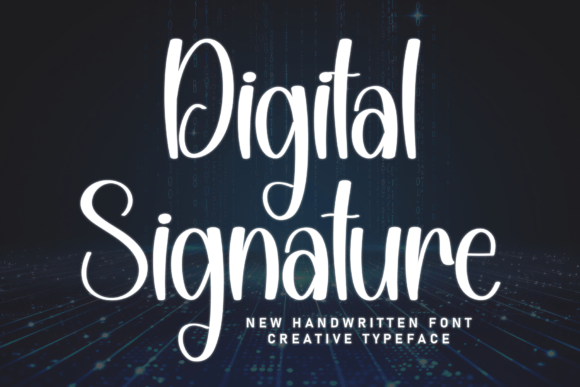
Digital Signature: Integrating Sleek Typography into Modern Creative Workflows
In the current landscape of digital branding and content creation, the distinction between automated efficiency and human artistry is often blurred. Professionals across industries seek tools that bridge this gap, offering the precision of modern technology while retaining the organic warmth of personal expression. Digital Signature serves as a critical asset in this pursuit. It is not merely a decorative element but a functional typographic tool designed to anchor visual identities. This typeface captures a sleek-and-human soul through elegant, tall letterforms and a fluid, upright rhythm that mimics the smooth motion of a stylus on glass. For creators, marketers, and entrepreneurs, integrating Digital Signature into a project workflow requires an understanding of its technical characteristics and its strategic application across various touchpoints.
Defining the Role of Digital Signature in Visual Hierarchy
Before implementing any typeface, it is essential to understand where it fits within the broader design system. Digital Signature is engineered for specific high-impact roles rather than general body text. Its clean strokes and artistic loops make it a premier choice for display purposes. In a practical workflow, this means reserving the font for moments where recognition and personality are paramount. The tall aspect ratio of the letterforms allows for tight tracking in horizontal layouts while maintaining legibility, making it ideal for social media headers and logo lockups. Conversely, the fluid nature of the script demands adequate negative space when used in vertical or centered compositions.
When planning a brand identity package, Digital Signature functions best as the primary identifier. It pairs effectively with geometric sans-serifs or neutral monospaced fonts for supporting text. This contrast reinforces the high-tech yet personalized aesthetic. During the mood boarding phase, designers should test Digital Signature against existing brand assets to ensure the "stylus-on-glass" motion complements rather than competes with photography styles and color palettes. This preparatory step prevents friction later in the production cycle and ensures the typeface enhances the overall user experience.
Pre-Production: Asset Preparation and Technical Setup
Successful integration begins before the first design file is opened. Proper asset management ensures consistency across platforms and devices. Because Digital Signature relies on fluid connectivity between characters, selecting the correct OpenType features during setup is vital. Many creative applications allow users to enable contextual alternates and ligatures by default. Configuring these settings early in the template creation process saves significant time during execution. Without these features enabled, the "smooth motion" effect can appear disjointed, undermining the professional quality of the output.
For teams working across multiple software ecosystems, verifying format compatibility is a necessary quality control measure. Ensure you have installed OTF or TTF versions appropriate for your primary design tools, whether Adobe Creative Cloud, Figma, or Canva. If the project involves web deployment, confirm licensing rights for webfont usage and generate WOFF2 files to maintain performance standards. Organizing these assets in a shared cloud library or design system repository ensures that every team member accesses the same version, preventing discrepancies in client deliverables.
Execution: Application in Branding and Photography
The versatility of Digital Signature becomes apparent during the active creation phase. For independent tech branding, the font’s upright rhythm conveys innovation without sacrificing approachability. When designing business cards or digital stationery, use the typeface for the name or company title to establish immediate authority. The artistic loops add a layer of sophistication that distinguishes tech startups from sterile corporate entities. In these applications, alignment is key; the tall letterforms often require optical adjustment when placed next to icons or logomarks to achieve visual balance.
Professional photographers benefit significantly from Digital Signature when creating watermarks and portfolio overlays. The font’s resemblance to handwriting adds a bespoke signature feel to images, reinforcing copyright ownership while enhancing the image's aesthetic value. Unlike standard serif signatures that can look dated, Digital Signature maintains a contemporary edge suitable for modern editorial and commercial photography. When applying watermarks, consider opacity and blending modes. The clean strokes hold up well at lower opacities, ensuring the mark remains visible but unobtrusive. This practical application turns a legal necessity into a branding opportunity, embedding the creator's identity directly into the visual content.
Optimizing for Social Media and Digital Headers
Social media platforms present unique challenges regarding typography due to varying screen sizes and compression algorithms. Digital Signature excels in high-impact personal-brand headers because of its distinct silhouette. However, creators must account for platform-specific safe zones. When designing LinkedIn banners or YouTube channel art, place the typeface centrally to avoid cropping on mobile devices. The fluid rhythm of the font guides the viewer’s eye across the header, making it an effective tool for directing attention toward profile pictures or call-to-action buttons.
For video content and streaming overlays, Digital Signature offers excellent readability at larger sizes. Motion graphics artists can animate the typeface to mimic the actual writing process, further emphasizing the human touch. This dynamic application aligns perfectly with the font’s design intent. When exporting video assets, ensure the text is rasterized or embedded correctly to prevent font substitution errors on different playback systems. Testing exports on multiple devices guarantees that the sleek aesthetic translates accurately from the editing timeline to the end viewer’s screen.
Post-Production: Quality Control and Consistency Checks
After the initial design execution, a rigorous review process ensures the typeface performs as intended. Readability testing is crucial, especially for Digital Signature. While the font is legible, its stylistic nature means it can become difficult to parse if scaled too small or set in low-contrast colors. Review all deliverables at actual size and on target devices. If the artistic loops merge indistinctly at smaller scales, adjust the tracking or switch to a simpler weight. This attention to detail preserves the professional integrity of the project.
Consistency audits are equally important for long-term brand health. Create a style guide entry specifically for Digital Signature that documents approved use cases, pairing recommendations, and prohibited modifications. Distorting the aspect ratio or manually altering the vector paths can destroy the carefully crafted rhythm of the typeface. By codifying these rules, teams protect the asset’s value over time. This documentation serves as a reference for new hires and external contractors, ensuring that the sleek-and-human soul of the brand remains intact regardless of who executes the work.
Strategic Integration Across Business Workflows
Beyond pure design tasks, Digital Signature plays a role in broader business communication strategies. For educators and coaches, using this typeface in presentation slides or course materials can soften the learning environment, making technical subjects feel more accessible. The human quality of the script builds rapport with audiences accustomed to sterile digital interfaces. In email marketing, utilizing Digital Signature for sign-offs or section headers increases engagement by breaking the monotony of standard system fonts. However, always provide a web-safe fallback in HTML emails to guarantee delivery integrity.
Freelancers and consultants can leverage Digital Signature in proposals and invoices to elevate perceived value. A customized typographic treatment signals attention to detail and premium service positioning. When integrating the font into document workflows, create master templates in Word, Pages, or InDesign. This reduces repetitive formatting tasks and ensures every client-facing document adheres to brand standards. The efficiency gained through templating allows professionals to focus on content strategy rather than layout adjustments, streamlining the path from concept to delivery.
Long-Term Maintenance and Evolution
Typeface trends evolve, but functional typography endures. Digital Signature’s blend of technological sleekness and organic form gives it longevity in a market saturated with fleeting aesthetics. To maximize the return on investment, periodically reassess how the font interacts with new platforms and technologies. As augmented reality and spatial computing emerge, the fluid, upright rhythm of Digital Signature may find new applications in 3D environments and interactive displays. Staying informed about font rendering updates and variable font technologies ensures your implementation remains cutting-edge.
Ultimately, the successful use of Digital Signature depends on treating it as a systematic component of your creative infrastructure rather than a superficial decoration. By approaching selection, setup, execution, and maintenance with the same rigor applied to other business processes, professionals unlock the full potential of this versatile typeface. It transforms routine touchpoints into opportunities for connection, proving that even in a high-tech world, the human element remains the most powerful differentiator. Whether signing a digital contract, watermarking a masterpiece, or launching a tech startup, Digital Signature provides the typographic foundation for authentic, impactful communication.