Honeysuckle: Using Playful Display Type Without Sacrificing Professionalism
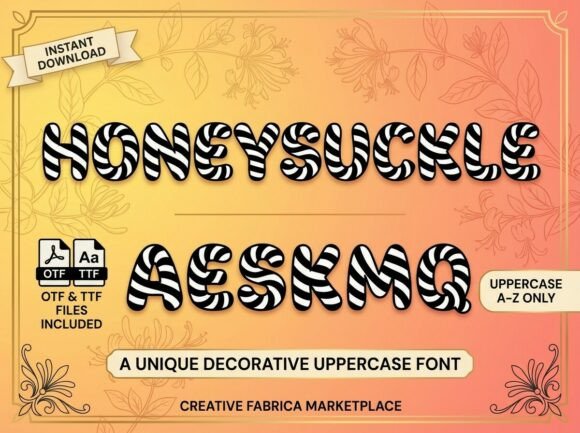
Sweeten your design projects with Honeysuckle, a playful and high-impact decorative font that pops right off the page. Featuring a bold, bubbly silhouette wrapped in a striking diagonal candy-stripe pattern, Honeysuckle captures a sense of whimsical energy and retro charm. Each character is designed with a soft, rounded structure that feels friendly, fun, and irresistibly tactile. Whether you’re designing for a boutique candy shop or a vibrant lifestyle brand, Honeysuckle brings a sweet edge to your creative toolkit. However, because this typeface carries so much inherent visual weight and texture, it requires a more deliberate approach than standard display fonts. Treating Honeysuckle like a conventional sans-serif or script often leads to cluttered layouts and legibility issues that undermine its cheerful aesthetic.
Understanding the Visual Weight of Patterned Typography
The most common mistake designers make when first working with Honeysuckle is underestimating how the internal candy-stripe pattern affects optical size. The diagonal lines create a texture that makes the letters appear denser and visually heavier than their actual vector outlines suggest. When set at the same point size as a solid-color display font, Honeysuckle can dominate a composition aggressively, pushing other elements into the background and creating an unbalanced hierarchy.
To avoid this, treat Honeysuckle as an illustration element rather than just text. You may need to reduce the point size by 10% to 15% compared to other headlines to achieve visual equilibrium. Always test your sizing in the final output medium—what looks balanced on a 27-inch monitor might feel overwhelming on a mobile screen or a printed postcard. The goal is to let the bubbly silhouette breathe without competing with essential supporting content.
Navigating Legibility and Contrast Challenges
Because Honeysuckle relies on an internal pattern for its identity, contrast management becomes critical. A frequent error is placing this textured font against busy backgrounds or photographs without adequate separation. The diagonal stripes can visually vibrate against similar patterns or get lost in mid-tone images, rendering the text unreadable. This is particularly problematic in digital environments where screen resolution varies.
- Avoid low-contrast pairings: Never place Honeysuckle over complex imagery without a solid overlay or drop shadow to create separation.
- Mind the background texture: Solid colors or subtle gradients work best; avoid backgrounds with diagonal lines or noise that clash with the font’s internal stripe.
- Test at small scales: If the stripes begin to blur or moiré at smaller sizes, the font is being used below its functional threshold.
If you must use Honeysuckle over photography, consider using it only for short, impactful words (three to five characters maximum) and ensure the underlying image has a consistent tonal value behind the text area. For longer phrases, switch to a complementary solid-weight typeface and reserve Honeysuckle for accent words or initials.
The Pitfalls of Overuse in Brand Systems
Honeysuckle’s retro charm is undeniable, but its personality is so specific that overusing it can quickly date a brand or make a design feel gimmicky. Beginners often fall into the trap of using this decorative face for multiple hierarchy levels—headlines, subheads, and call-to-action buttons—in an attempt to maintain thematic consistency. This creates visual fatigue and dilutes the specialness that makes the font effective in the first place.
A better approach is to establish Honeysuckle as a singular accent within a broader typographic system. Pair it with a clean, neutral sans-serif or a simple geometric serif that shares similar x-height proportions but lacks decorative texture. This contrast allows Honeysuckle to serve as a moment of delight rather than a constant shout. Think of it as the cherry on top of a sundae, not the entire bowl. When evaluating whether to use Honeysuckle for a project, ask yourself if the brand voice genuinely supports sustained playfulness or if the font is merely a stylistic overlay. Authenticity matters; forced whimsy reads as unprofessional.
Technical Considerations for Print and Digital Production
The intricate stripe pattern in Honeysuckle introduces production considerations that solid fonts don’t have. In print, fine diagonal lines can fill in or break up depending on paper stock and printing method. On uncoated papers, ink spread may cause the white spaces between stripes to close, turning the text into a muddy blob. Conversely, on glossy stocks with poor registration, the stripes might appear misaligned or jagged.
Before committing to a large print run, request a physical proof on your exact paper stock. If the stripes are too delicate for your chosen medium, consider using Honeysuckle only at larger sizes where the pattern remains crisp, or explore whether the foundry offers alternate weights or simplified versions optimized for smaller reproduction. For digital use, verify how the font renders across different operating systems and browsers. Some rendering engines struggle with inline patterns at certain pixel densities, causing the stripes to flicker or disappear entirely during scrolling.
Evaluating Licensing and File Integrity
When acquiring Honeysuckle, ensure you’re obtaining complete, legitimate files from authorized distributors. Decorative fonts with embedded patterns sometimes suffer from incomplete character sets or missing OpenType features in pirated or poorly converted versions. Missing glyphs can result in fallback characters that break the visual rhythm, while absent ligatures or alternates limit your ability to refine spacing and flow.
Review the license terms carefully before purchase. Commercial licenses for decorative fonts often have tiered pricing based on usage scope—webfont impressions, app embedding, merchandise, or broadcast use are frequently separate line items. Assuming a desktop license covers all applications can lead to compliance issues down the road. Additionally, check whether the license permits modification; some designers want to adjust the stripe angle or color for brand customization, but this may require explicit permission or an extended license.
Making Informed Decisions Before Implementation
Before integrating Honeysuckle into any project, conduct a practical audit of your specific needs. Create mockups in the actual intended context rather than relying on specimen sheets. Test readability at the smallest size you anticipate using. Evaluate whether the retro tone aligns with your audience’s expectations and your brand’s long-term positioning. Consider accessibility requirements; highly decorated typefaces can be challenging for users with visual processing differences, so always provide alternative text or ensure critical information isn’t conveyed solely through Honeysuckle.
Ultimately, Honeysuckle succeeds when designers respect its unique characteristics rather than fighting them. By acknowledging its visual density, managing contrast thoughtfully, limiting its role within a larger system, and verifying technical suitability, you transform what could be a risky decorative choice into a confident, memorable design asset. The sweetness should enhance the experience, not overwhelm it.